نظام إدارة المستودعات السحابي مقابل نظام إدارة المستودعات المحلي: أي نموذج نشر هو الأنسب لمستودعك؟ (2026)
Sep 08, 2026
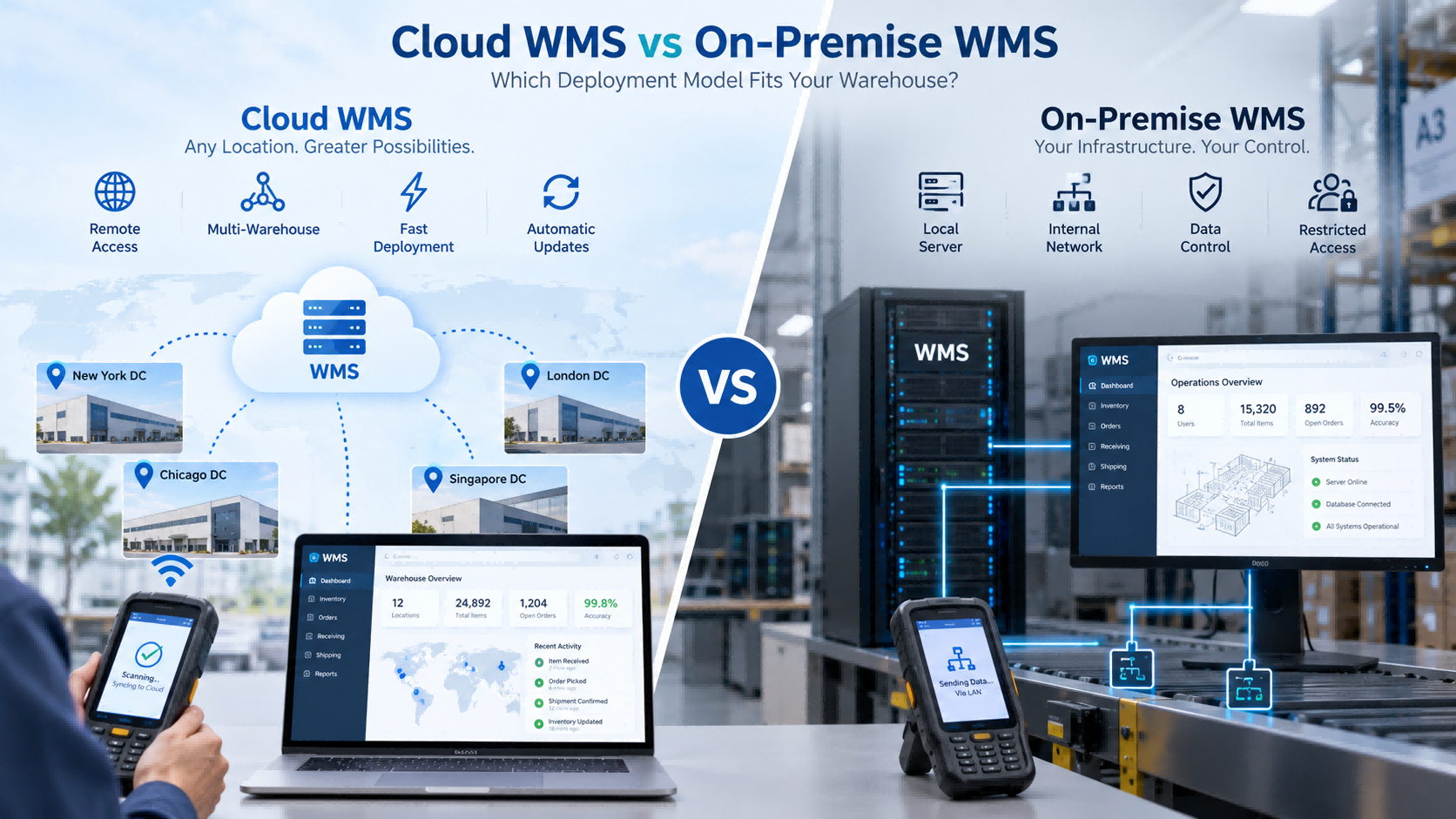
إن اختيار نظام إدارة المستودعات لا يقتصر فقط على الوظائف.عليك أيضاً أن تقرر أين سيتم تشغيل النظام.بالنسبة لمعظم الشركات، يعني ذلك الاختيار بين:نظام إدارة المستودعات السحابيونظام إدارة المستودعات المحليكلاهما يدعم عمليات الاستلام والتخزين والجرد والانتقاء والشحن ومسح الباركود وعمليات أجهزة المساعد الرقمي الشخصي المحمولة وتكامل نظام تخطيط موارد المؤسسات.يكمن الاختلاف بشكل أساسي في كيفية استضافة النظام وصيانته والوصول إليه والتحكم فيه. إجابة سريعة اختر نظام إدارة المستودعات السحابي إذا كنت ترغب في:نشر أسرعبنية تحتية محلية أقل لتكنولوجيا المعلوماتسهولة الوصول إلى مواقع متعددةتحديثات أبسطدعم عن بعد أسهل اختر نظام إدارة المستودعات المحلي إذا كنت بحاجة إلى:نشر الشبكة الداخليةالتحكم المحليالوصول الخارجي المقيدقواعد البيانات التي تديرها الشركةسياسات محددة لتكنولوجيا المعلومات أو الأمن بالنسبة للعديد من المستودعات الصغيرة والمتوسطة، يُعدّ استخدام الحوسبة السحابية أسهل للبدء.لكن إذا كانت سياسة تكنولوجيا المعلومات الخاصة بك تتطلب بقاء النظام داخل شبكتك الخاصة، فإن القرار يتغير على الفور. ما هو نظام إدارة المستودعات السحابي (Cloud WMS)؟يتم استضافة نظام إدارة المستودعات السحابي على بنية تحتية سحابية ويتم الوصول إليه عادةً من خلال متصفح أو اتصال بالشبكة.قد يستمر مشغلو المستودعات في استخدام نفس الأجهزة:جهاز مساعد رقمي محمول باليدماسح ضوئي للباركودطابعة الباركودقارئ RFIDيكمن الاختلاف في مكان تشغيل النظام المركزي.الهيكل النموذجي هو: جهاز مساعد رقمي شخصي → شبكة → نظام إدارة المستودعات السحابي غالباً ما تختار الشركات التي ترغب في نشر أسرع، ووصول مركزي، وصيانة أقل للخوادم المحلية، النشر السحابي. ما هو نظام إدارة المستودعات المحلي (On-Premist-WMS)؟يعمل نظام إدارة المستودعات المحلي داخل بيئة تكنولوجيا المعلومات الخاصة بالعميل.الهيكل النموذجي هو: جهاز المساعد الرقمي الشخصي → الشبكة الداخلية → الخادم المحلي وهذا يعني عادةً أن العميل مسؤول عن جزء أكبر من البنية التحتية، بما في ذلك:خادمقاعدة البياناتشبكةالنسخ الاحتياطيةصيانة النظامغالباً ما يتم اختيار هذا النموذج عندما يجب أن يبقى النظام داخل شبكة داخلية أو عندما تحد سياسة الشركة من الوصول الخارجي. نظام إدارة المستودعات السحابي مقابل نظام إدارة المستودعات المحلي: الاختلافات الرئيسية عاملنظام إدارة المستودعات السحابينظام إدارة المستودعات المحليالانتشارعادة أسرعالمزيد من الاستعدادات للبنية التحتيةالخادم المحليعادة غير مطلوبمطلوب عادةصيانة تكنولوجيا المعلوماتانخفاض العبء الداخليمزيد من المسؤولية الداخليةإمكانية الوصول إلى مواقع متعددةأسهليعتمد ذلك على تصميم الشبكةالوصول عن بعدأسهليتطلب تهيئةالتحديثاتعادة ما تتم إدارتها من قبل مقدم الخدمةعادة ما تتم إدارتها من قبل العميلبيئة البياناتمُستضاف على السحابةيتحكم بها العميلللشبكة الداخلية فقطأقل ملاءمة في بعض الحالاتغالباً ما يكون أكثر ملاءمةقابلية التوسعأسهل في التوسعيعتمد ذلك على البنية التحتية المحلية يقدم هذا الجدول نظرة عامة سريعة، لكن القرار الحقيقي عادة ما يعتمد على بيئة تكنولوجيا المعلومات الخاصة بك. التكلفة والنشر والصيانة عادةً ما يقلل نظام إدارة المستودعات السحابي من الحاجة إلى بناء بنية تحتية للخادم المحلي قبل الإطلاق.وهذا من شأنه أن يجعل التنفيذ أسرع، خاصة بالنسبة للشركات الصغيرة التي لا تملك فريقًا متخصصًا في تكنولوجيا المعلومات.يتطلب التثبيت في الموقع مزيدًا من التحضير.قد تحتاج المنظمة إلى إجراء التكوين التالي:الخوادمقواعد البياناتأذونات الشبكةسياسات النسخ الاحتياطيالوصول الداخليتختلف التكلفة أيضاً.يتضمن نظام إدارة المستودعات السحابي عادةً اشتراكًا في البرامج، ومستخدمين، ووحدات، وتنفيذًا، وأجهزة متصلة.قد يتطلب التشغيل في الموقع بنية تحتية أولية أكبر وصيانة داخلية مستمرة.السؤال المهم ليس ببساطة:أيهما أرخص؟والسؤال الأفضل هو:أي نموذج سيقلل من إجمالي عبء العمل والتكلفة الإجمالية لتكنولوجيا المعلومات لشركتنا خلال السنوات القليلة القادمة؟ تجربة مشروع حقيقية من FYJ: نظام إدارة المستودعات السحابي لمستودع تجارة إلكترونية ذي حجم كبير في أحد مشاريع مستودعات FYJ في تايلاند، تعامل العميل مع حوالي 500 طلب يوميًا وما يقرب من 3000 وحدة تخزين.استخدم المشروع نظام إدارة المستودعات السحابي بالإضافة إلى طباعة ومسح الرموز الشريطية، وتنبيهات التجديد، وإدارة المخزون البطيء الحركة ونظام ABC، ووظائف المستودعات المتعددة، والانتقاء عبر الأجهزة المحمولة.بعد التنفيذ:تحسنت دقة المخزون من 92% إلى 99.5%انخفضت أخطاء الشحن من 3% إلى 0.5%انخفضت مسافة المشي داخل المستودع بنحو 40%تحسّن معدل دوران المخزون من 75 يومًا إلى 45 يومًايمكن إتمام عملية الإغلاق اليومي في أقل من 10 دقائقبالنسبة لهذا النوع من العمليات، كان النشر السحابي منطقياً لأن المستودع كان بحاجة إلى وصول مركزي ومتنقل ومتعدد المستودعات دون إنشاء بيئة خادم محلية أكثر تعقيداً. الوصول إلى مستودعات متعددة وعن بُعد وهنا تكمن الميزة العملية التي غالباً ما تتمتع بها أنظمة إدارة المستودعات السحابية.إذا كانت الشركة تدير عدة مستودعات، فإن النشر السحابي يسهل على المقر الرئيسي والمواقع المختلفة استخدام نفس المنصة.يمكن للإدارة الاطلاع على ما يلي:المخزون حسب المستودعالانتقالاتحالة الواردحالة المغادرةتغييرات المخزوندون الحاجة إلى الحفاظ على أنظمة محلية منفصلة.يمكن للأنظمة المحلية أيضًا دعم مستودعات متعددة، ولكن الشركة عادة ما تحتاج إلى المزيد من تخطيط الشبكة الداخلية بين المواقع.بالنسبة لمستودع واحد، قد لا يكون لهذا الاختلاف أهمية كبيرة.بالنسبة لخمسة أو عشرة مواقع، يصبح الأمر أكثر أهمية بكثير. ماذا يحدث إذا انقطع الإنترنت؟ هذا أحد أكثر الأسئلة العملية التي يجب على المشترين طرحها.يعتمد نظام إدارة المستودعات السحابي بشكل كبير على اتصال الشبكة.قبل اختياره، اسأل:هل يمكن للجهاز المساعد الرقمي الشخصي العمل دون اتصال بالإنترنت؟هل يمكن تخزين المعاملات مؤقتًا؟ماذا يحدث أثناء الاستقبال في حالة تعطل الشبكة؟ماذا يحدث أثناء عملية قطف الثمار؟كيف تتم مزامنة البيانات بعد إعادة الاتصال؟بالنسبة للمستودعات التي تعاني من عدم استقرار الإنترنت، قد يكون هذا الأمر أكثر أهمية من العديد من ميزات البرامج.غالباً ما تستطيع الأنظمة الموجودة في الموقع الاستمرار في العمل داخل الشبكة المحلية، وذلك حسب بنية النظام. عندما يصبح النشر المحلي هو الخيار الأمثل في بعض مشاريع السنة الأولى، يتم تحديد نموذج النشر فعلياً قبل مناقشة وظائف البرمجيات.إذا تضمنت متطلبات العميل ما يلي:الشبكة الداخلية فقطالخادم المحليالوصول الخارجي المقيدقاعدة بيانات تسيطر عليها الشركةسياسة صارمة لتكنولوجيا المعلوماتعندها قد يكون النشر السحابي غير مناسب بالفعل.تدعم مجموعة برامج FYJ كلاً من النشر السحابي والنشر المحلي/الخاص، مما يسمح باختيار البنية وفقًا لبيئة تكنولوجيا المعلومات الخاصة بالعميل.هذه نقطة مهمة:لا ينبغي اختيار الحلول المحلية لمجرد أنها "تبدو أكثر أمانًا".ينبغي اختياره عندما يكون التحكم المحلي مطلباً حقيقياً. تكامل نظام تخطيط موارد المؤسسات (ERP): يمكن استخدام كل من السحابة والأنظمة المحلية. لا يتم تحديد تكامل نظام تخطيط موارد المؤسسات (ERP) من خلال نموذج النشر فقط.يمكن دمج كل من أنظمة إدارة المستودعات السحابية والمحلية مع أنظمة تخطيط موارد المؤسسات إذا كانت الأنظمة توفر واجهات مناسبة.قبل التنفيذ، حدد ما يلي:أين يتم إنشاء وحدات SKU؟أين يتم إنشاء أوامر الشراء؟أين يتم إنشاء أوامر البيع؟أي نظام يمتلك المخزون؟كيف تتم مزامنة التعديلات؟هل التزامن في الوقت الفعلي مطلوب؟إذا لم تكن هذه الأسئلة واضحة، فقد ينتهي الأمر بالموظفين إلى إدخال نفس المعاملة مرتين.هذا يُفقد أحد الأسباب الرئيسية لإدخال نظام إدارة المستودعات (WMS). هل يؤدي النشر إلى تغيير معدات المستودعات؟ عادةً، ليس كثيراً.يمكن لكلا النموذجين استخدام:جهاز مساعد رقمي محمول باليدماسح ضوئي للباركودطابعة الباركودقارئ RFID محمول باليدقارئ RFID ثابتطابعة RFIDملصقات الباركود أو RFIDقد يقوم عامل المستودع بنفس الإجراء تمامًا:امسح المنتج ضوئيًا ← امسح الموقع ضوئيًا ← أكد الكميةما يتغير هو وجهة البيانات.سحابجهاز مساعد رقمي شخصي → شبكة → نظام إدارة المستودعات السحابيفي الموقعجهاز المساعد الرقمي الشخصي → الشبكة الداخلية → الخادم المحليلذا فإن اختيار الحوسبة السحابية مقابل الحوسبة المحلية هو في الأساس قرار يتعلق ببنية البرمجيات، وليس قرارًا يتعلق بأجهزة المستودعات. أي طراز يناسب مستودعك؟ اختر نظام إدارة المستودعات السحابي (Cloud WMS) عندما:تريد نشرًا أسرعفريق تكنولوجيا المعلومات لديكم صغيرلديك عدة مستودعاتيُعد الوصول عن بُعد أمرًا مهمًااتصالك بالإنترنت موثوقتتوقع أن ينمو هذا النشاط اختر نظام إدارة المستودعات المحلي عندما:يجب أن يعمل المستودع داخل شبكة داخليةالوصول الخارجي مقيدتتطلب الشركة خوادم محليةيرغب موظفو تكنولوجيا المعلومات في التحكم المباشر بالبنية التحتيةتتطلب سياسة الشركة النشر المحلي إذا كان كلا النموذجين ممكنين من الناحية التقنية، فقم بمقارنة التكلفة الإجمالية، وعبء العمل في مجال تكنولوجيا المعلومات، وقابلية التوسع، واحتياجات التكامل المستقبلية. مصفوفة قرارات نشر نظام إدارة المستودعات وضعك نقطة انطلاق أفضلفريق تكنولوجيا معلومات صغيرنظام إدارة المستودعات السحابينحتاج إلى طرح سريعنظام إدارة المستودعات السحابيمواقع مستودعات متعددةنظام إدارة المستودعات السحابيالوصول عن بعد مطلوبنظام إدارة المستودعات السحابيمن المتوقع توسع سريعنظام إدارة المستودعات السحابيللشبكة الداخلية فقطفي الموقعالخادم المحلي مطلوبفي الموقعالإنترنت الخارجي مقيدفي الموقعتتحكم الشركة في البنية التحتية لتكنولوجيا المعلوماتقد يكون التثبيت المحلي مناسبًاالتكامل مع نظام تخطيط موارد المؤسسات (ERP) مطلوب أيضاًيلزم وجود رمز شريطي أو تقنية تحديد الهوية بموجات الراديو (RFID)أيضاًالإنترنت غير مستقر يقيمإمكانية التشغيل في الموقع أو دون اتصال بالإنترنت أسئلة يجب طرحها على مورد نظام إدارة المستودعات قبل اتخاذ القرار، اسأل:هل تدعمون الحوسبة السحابية، أو الحوسبة المحلية، أو كليهما؟أين سيتم تخزين بياناتنا؟من يدير عمليات النسخ الاحتياطي؟من المسؤول عن التحديثات؟ماذا يحدث إذا انقطع الإنترنت؟هل يمكن لأجهزة المساعد الرقمي الشخصي المحمولة العمل دون اتصال بالإنترنت؟هل يمكن لعدة مستودعات استخدام نفس النظام؟هل يمكن دمج نظام إدارة المستودعات مع نظام تخطيط موارد المؤسسات الخاص بنا؟ما هي البنية التحتية لتكنولوجيا المعلومات المطلوبة؟هل يمكن تغيير نموذج النشر لاحقاً؟إذا لم يتمكن المورد من الإجابة على هذه الأسئلة بوضوح، فمن المحتمل أن بنية النشر لم يتم تحديدها بالكامل بعد. كيف تتعامل شركة FYJ مع نشر نظام إدارة المستودعات (WMS) يدعم نظام FYJ كلاً من نشر إدارة المستودعات السحابية والمحلية.يبدأ الاختيار عادةً ببعض الأسئلة العملية:كم عدد المستودعات المعنية؟هل يحتاج المقر الرئيسي إلى الوصول عن بُعد؟هل الإنترنت موثوق؟هل لدى العميل فريق تكنولوجيا معلومات داخلي؟هل يلزم النشر المحلي؟هل يحتاج نظام إدارة المستودعات (WMS) إلى التكامل مع نظام تخطيط موارد المؤسسات (ERP)؟هل سيستخدم المشغلون أجهزة المساعد الرقمي الشخصي المحمولة؟هل يكفي استخدام الباركود، أم أن تقنية تحديد الهوية بموجات الراديو (RFID) مطلوبة؟يتم اختيار نموذج النشر بعد أن تصبح هذه المتطلبات واضحة.من الناحية العملية، لا نوصي باستخدام الحوسبة السحابية أو الحوسبة المحلية لمجرد أن أحدهما أحدث.يجب أن يتناسب النظام مع كل من سير العمل في المستودع وبيئة تكنولوجيا المعلومات الخاصة بالعميل. الأسئلة الشائعة هل نظام إدارة المستودعات السحابي أفضل من نظام إدارة المستودعات المحلي؟ليس دائمًا. غالبًا ما يكون نظام إدارة المستودعات السحابي أسهل في النشر والصيانة. أما النظام المحلي فهو أنسب عند الحاجة إلى التحكم في الشبكة الداخلية أو الخادم المحلي.هل نظام إدارة المستودعات السحابي أرخص؟قد يقلل ذلك من تكلفة البنية التحتية الأولية، لكن التكلفة الإجمالية لا تزال تعتمد على الاشتراكات والمستخدمين والتكامل والأجهزة والتشغيل على المدى الطويل.هل يتطلب نظام إدارة المستودعات السحابي (Cloud WMS) الوصول إلى الإنترنت؟عادةً نعم. اسأل عما إذا كان النظام أو الجهاز المساعد الرقمي الشخصي يدعم سير العمل دون اتصال بالإنترنت عند انقطاع الاتصال.هل نظام إدارة المستودعات المحلي أكثر أمانًا؟ليس تلقائياً. فهو يمنح العميل تحكماً مباشراً أكبر في البيئة المحلية، لكن الأمن الفعلي يعتمد على تصميم النظام، والتحكم في الوصول، والصيانة، وإدارة تكنولوجيا المعلومات.هل يمكن دمج كلا النموذجين مع نظام تخطيط موارد المؤسسات (ERP)؟نعم، إذا كانت واجهات برمجة التطبيقات أو طرق التكامل المناسبة متوفرة.هل يدعم كل من نظام إدارة المستودعات السحابي والمحلي تقنية الباركود وتقنية تحديد الهوية بموجات الراديو (RFID)؟نعم. تعتبر تقنيات الباركود وتقنية تحديد الهوية بموجات الراديو (RFID) من تقنيات جمع البيانات ويمكن استخدامها مع أي من نموذجي النشر عندما يدعمها البرنامج. خاتمة يمكن لكل من نظام إدارة المستودعات السحابي ونظام إدارة المستودعات المحلي دعم عمليات المستودعات بشكل فعال.بالنسبة للعديد من المستودعات المتنامية، يُعد نظام إدارة المستودعات السحابي (Cloud WMS) أسهل في النشر والتوسع.بالنسبة للمؤسسات التي لديها شبكات داخلية خاضعة للرقابة أو متطلبات بنية تحتية محلية صارمة، قد يكون خيار On-Premise هو الخيار الأكثر عملية.السؤال الأساسي ليس:أي نموذج أفضل؟إنها:أي نموذج يناسب بيئة تكنولوجيا المعلومات لدينا، وسير العمل في المستودع، والنمو المستقبلي؟هذا هو القرار الذي ينبغي أن يوجه مشروع إدارة المستودعات.
اقرأ أكثر


 ar
ar 


 دعم شبكة IPv6